


Boost Mobile
4.635.55K Reviews
App Specs
- Version
- 4.1.22
- Updated On
- License
- Free
- Downloads
- 5,000,000+
- Developer
- DISH Wireless L.L.C.
- Categories
- Communication
- Platform
- Android, iOS
Screenshots

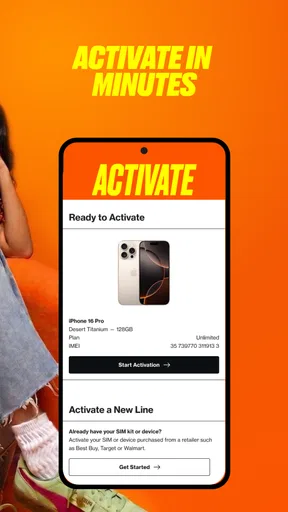
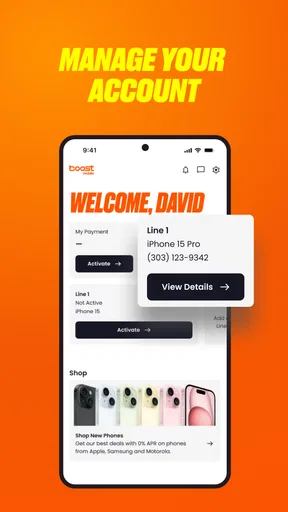
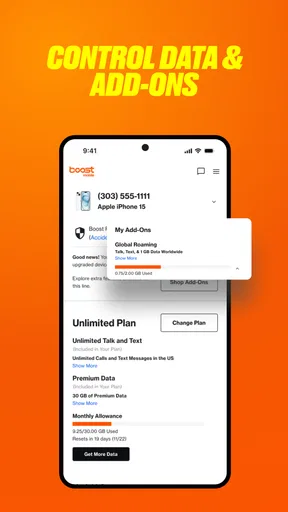
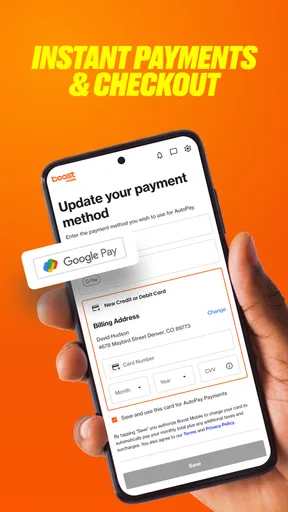
 Analysis by AppCompare
I judge a carrier account app by a practical test: can I handle an ordinary account task without turning it into a support call? That is the role of Boost Mobile. It is a free communication app from DISH Wireless L.L.C., designed for people who want to manage their Boost Mobile account from a phone. It is not a general-purpose messaging app, and its usefulness depends on having a reason to manage this particular service.
That distinction matters when weighing its value. The app itself costs nothing to download, so trying it does not require an app purchase. The service or plan you manage is a separate matter; I would not treat the app’s free access as evidence that mobile service, data, or any add-on is free. For an existing customer, the appeal is convenience: account tasks can be brought together in one place instead of relying on memory or looking for account details elsewhere.
What free access does—and does not—mean
Boost Mobile is listed as free, and that makes the download a low-commitment choice for someone who already uses the carrier. The app is rated for Everyone, and it has a 4.6 average from around 298,000 ratings. Those figures suggest plenty of people have encountered it, but they do not tell me whether every account task will work smoothly for every person. Your own experience can depend on the account and what you are trying to do.
I would separate three decisions: whether to install the app, whether to use it for account management, and whether Boost Mobile’s service suits your needs. Installing the app is free; choosing or changing mobile service is a broader decision. If you are comparing carriers, look at the plan terms and coverage that matter where you live rather than assuming the app’s convenience makes the service the right fit.
Why Boost Mobile Stands Out
Okay, let’s get right into it. First off, the Boost Mobile app is super intuitive. I mean, we’ve all been through the hassle of apps that make you want to throw your phone across the room, right? Not with this one. Everything feels just one tap away—from checking your balance to managing your plan. Seriously, it’s like they’ve read my mind.
Features That Caught My Eye
One of the coolest features has to be the easy plan management. You can switch plans, add more data, or even renew your current plan without breaking a sweat. The app even sends reminders when your data is running low. It’s like having a personal assistant who’s dedicated to keeping your mobile life in check!
And let’s talk about those exclusive deals and offers. Boost Mobile partners with some big names to bring you discounts that you probably won’t find anywhere else. It’s like a little treasure chest of savings right in your pocket.
Worth Reading Before You Choose

EA SPORTS FC Mobile 26 Is a Bigger Football Game, but It Takes Time

Flipboard Shows What News Apps Must Do Beyond the Feed

Switching to Android Auto Means Rethinking Your Driving Routine

Google Calendar Makes a Crowded Week Easier to Manage

Ludo King Makes the Most of the Minutes Between Plans

Baby Panda World Brings Quick Play to Modern Phones, but Its Game Library Feels Busy
Seamless User Experience
Navigation is a breeze. The developers clearly put a lot of thought into making sure that users, whether tech-savvy or not, can get around without any hiccups. The interface is clean, with just enough flair to keep things interesting but not so much that it feels overwhelming.
Besides, who doesn’t love a good dark mode feature? Not only does it save battery life, but it’s also easy on the eyes, especially during those late-night browsing sessions.
Performance and Reliability
Now, let’s talk performance. The app is surprisingly lightweight. It doesn’t lag, freeze, or crash, which is a huge plus in my book. Given how crucial mobile connectivity is, having a reliable app like this one makes all the difference.
Moreover, the customer support feature is readily accessible. If you ever run into issues, help is just a chat or call away. No more endless waiting on hold or being passed from one representative to another.
Making account chores easier in real life
The clearest payoff is avoiding small surprises. Imagine checking your account before a busy travel day: seeing your balance and plan information in the same place can help you decide whether you need to review your data use before leaving. I find that kind of quick check most useful when I am about to rely on my phone for directions, messages, or work, rather than when I am casually browsing an app.
A less obvious habit is to check the account before making a plan change, not just after. That gives you a moment to confirm what you intend to do and avoid treating a rushed tap as a decision. If you are considering adding data or renewing, pause to read the terms presented in the account flow; the convenience of an app does not replace checking what a change means for your service.
Low-data reminders can also be useful as prompts, rather than as a complete data-management system. I would treat a notification as a cue to review what is using data and whether my routine has changed. Someone streaming video on a commute may need a different response from someone who mainly uses maps and messaging. The reminder is most helpful when it leads to a decision, not when it becomes another alert to dismiss.
How it compares with other carrier options
Compared with calling customer support for routine account questions, a dedicated account app is appealing because it keeps basic management close at hand. Compared with a general-purpose phone settings screen, it is aimed at the carrier account rather than device-level controls. Those tools solve different problems: phone settings can help you understand device usage, while the carrier app is the place I would start for account and plan matters.
If you use more than one carrier or manage several lines through different providers, you may prefer a broader account-tracking routine, such as keeping renewal dates and plan notes in a calendar or password manager. That approach is less convenient for making account changes, but it can give you a single reference point across services. Boost Mobile is the more direct choice when the task specifically concerns a Boost Mobile account; it is not a substitute for tools that organize several providers together.
The app is also not the right answer to every connectivity problem. If your concern is poor signal in a particular place, an account-management app cannot make that location’s coverage better. I would check service suitability separately and use the app for account tasks, rather than confusing easy management with network performance.
Small trade-offs worth thinking about
Account apps are most useful when you can sign in easily and keep access secure. I recommend setting aside a calm moment to get familiar with the account screen rather than waiting until you are nearly out of data or need to make a change quickly. If a family member handles the account, agree on who is responsible for checking it and making plan decisions; two people acting independently can create avoidable confusion.
There is also a practical distinction between a reminder and a guarantee. A notification can help you notice that your data is running low, but I would not rely on it as my only method of staying within a personal budget or usage target. Check the account when the information matters to you, and keep your own calendar reminder if a renewal date is important. That backup costs little effort and avoids making one app notification responsible for your whole routine.
The app has a broad audience: it has passed five million installs, and its current version is 4.1.14. It supports Android 8.0 and later. Those details are useful when deciding whether an older Android phone can run it, but they do not guarantee the same experience on every device. I would keep the app updated through the usual store process and make sure the phone itself can still handle the tasks I depend on.
Who will get the most from it
I would recommend it first to current Boost Mobile customers who regularly check their balance, review their plan, or want an easier route to account support. It is especially handy for people who prefer handling routine matters on their own time instead of calling for every small question. A busy parent keeping an eye on a shared household account, for example, may appreciate having a place to review it before a school trip or a long drive.
It may also suit someone who is new to managing a phone plan and wants a straightforward starting point. The useful approach is to learn where the account information and plan controls are before an urgent need comes up. That way, a low-data alert or a planned renewal is less likely to become a stressful search through menus.
I would skip it if you are not a Boost Mobile customer and have no reason to manage an account there. I would also avoid choosing a carrier solely because its app looks convenient. For someone who rarely touches account settings, a carrier’s website or occasional customer-support contact may be enough; for someone comparing coverage, pricing, or service terms, those questions deserve attention before the app does.
Final Thoughts
So, is Boost Mobile worth downloading? In my opinion, absolutely! Whether you’re someone who’s always on the move or just looking for a straightforward way to manage your mobile service, this app is a solid choice. It’s efficient, user-friendly, and offers some sweet deals that are hard to pass up.
In a world where apps can sometimes feel like a dime a dozen, Boost Mobile manages to stand out by focusing on what truly matters—making your life easier. Give it a whirl and see if it’s the game-changer you’ve been searching for!
Pros
- User-friendly interface for easy navigation.
- Flexible plans with no annual contracts.
- Wide coverage across the United States.
- Affordable international calling options.
- Includes mobile hotspot with most plans.
Cons
- Limited customer service availability.
- Data speeds can be throttled after high usage.
- Some plans lack unlimited data options.
- Roaming charges may apply in certain areas.
- Device compatibility limitations on some models.
FAQs for Boost Mobile
What features does the Boost Mobile app offer?
The Boost Mobile app is packed with features designed to enhance the user experience. It allows users to manage their accounts, pay bills, monitor data usage, and access customer support. Additionally, users can explore exclusive offers and deals directly through the app, making it a convenient tool for managing all mobile-related needs.
Is the Boost Mobile app available for both Android and iOS?
Yes, the Boost Mobile app is available for download on both Android and iOS devices. Users can find the app on the Google Play Store for Android devices, and the Apple App Store for iOS devices, ensuring broad accessibility and convenience for all Boost Mobile customers.
How secure is the Boost Mobile app for managing my account?
Boost Mobile prioritizes user security, incorporating robust security measures to protect personal and financial information. The app uses encryption and other security protocols to safeguard data. Users are encouraged to create strong passwords and enable additional security features, such as two-factor authentication, for enhanced protection.
Can I track my data usage using the Boost Mobile app?
Yes, the Boost Mobile app provides real-time data tracking, allowing users to monitor their data usage easily. This feature helps users avoid overages by providing detailed insights into their data consumption patterns, making it simple to manage and adjust usage as needed to stay within plan limits.
Are there any costs associated with downloading the Boost Mobile app?
Downloading the Boost Mobile app is free for all users. However, any actions taken within the app, such as purchasing additional data or plans, will incur costs according to the user's mobile plan. Users should ensure they are connected to Wi-Fi when downloading the app to avoid data charges.


